



Updated iRacing Wheelbase Settings – Part 1
We’ve worked on a new updated guide to iRacing wheelbase settings (30/6/26)
They are made to work with both 360hz and without.
These settings will cover a lot of content and dive deep into many different racing categories.
We dive into GT racing with some great details at first. Even if GT racing isn’t your thing, you’ll want to check it out anyway – those insights will absolutely help you speed up on track!
Part 1:
– Standard/GT
– Prototype
– Formula
Part 2:
– Oval
– Dirt Oval
– Dirt Road
Let’s dive into one of the most competitive series in iRacing – Roadcars and GT racing.
Standard/GT Settings RaceHub:
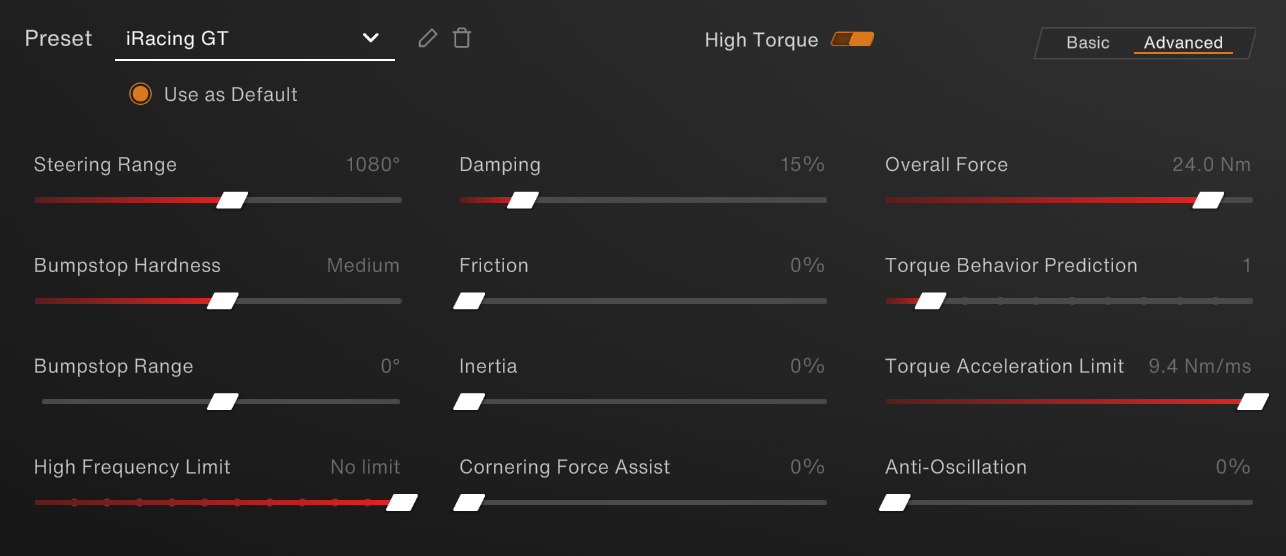
For our Standard/GT settings, we’ve made settings that work for all starter cars up to GT3 cars.
For optimal wheelbase strength, we designed the settings to deliver maximum performance without feeling overpowering. You can always reduce the strength if it feels too intense.
For our GT settings, it is configured as follows:
- Invicta: 24 Nm
- Forte: 18 Nm
- La Prima+: 16 Nm
- La Prima: 12 Nm
- Initium+: 8 Nm
- Initium: 5.5 Nm
Torque Acceleration limit (slew rate): Maximum Wheelbase Limit: We have increased this from our previous setting of 1.5. This adjustment ensures optimal performance with and without 360 Hz support.
Damping: 15% – this is added to help with extra smoothing and weight to the cars, so you still get that feeling of weight.
Torque Behavior Prediction: 1 – this setting delivers a smoother steering feel while preserving strong detail and feedback while driving. For a more raw experience, try disabling it.
Steering range: 1080° – this ensures that all cars use iRacing’s auto end stop. You want this to align with iRacing during wheelbase calibration.
Standard/GT Settings In-game
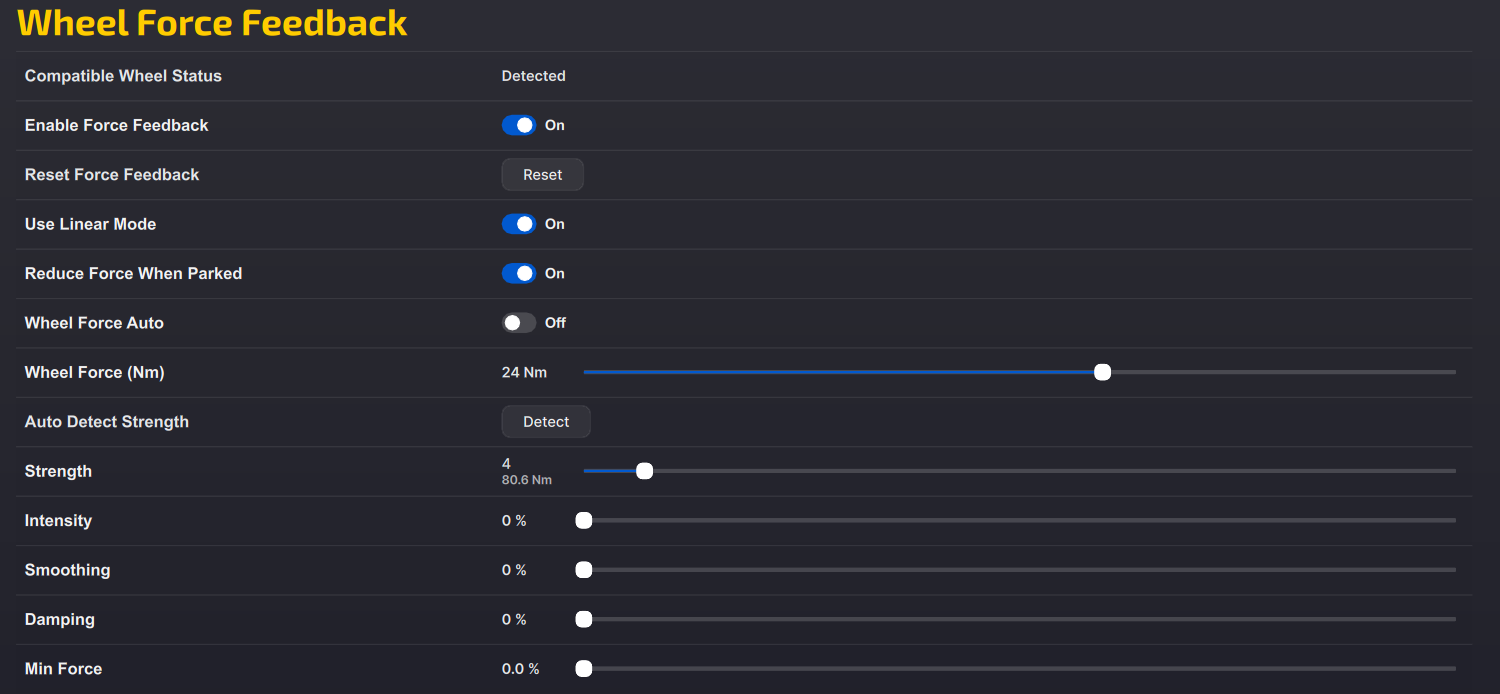
Wheel Force (This setting needs to match the same value in RaceHub:
- Invicta: 24 Nm
- All other bases: Max wheelbase strength
- Intensity: All wheelbases: 0-10%
Intensity determines how much the auto calibrater calculates the FFB.
You use this feature by doing a lap in game, and then going to the graphics adjustments black box.
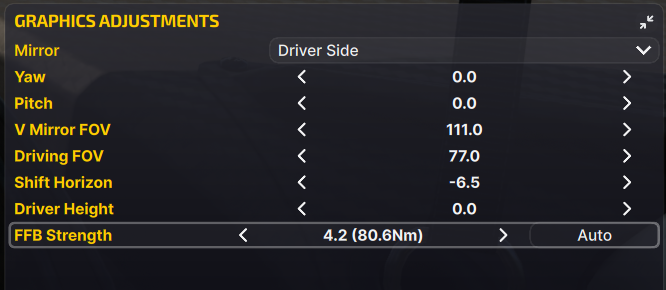
After you have done a lap, press ‘Auto’.
If the FFB strength remains too low, you can adjust it using the arrows on either side.
Prototype Settings RaceHub:
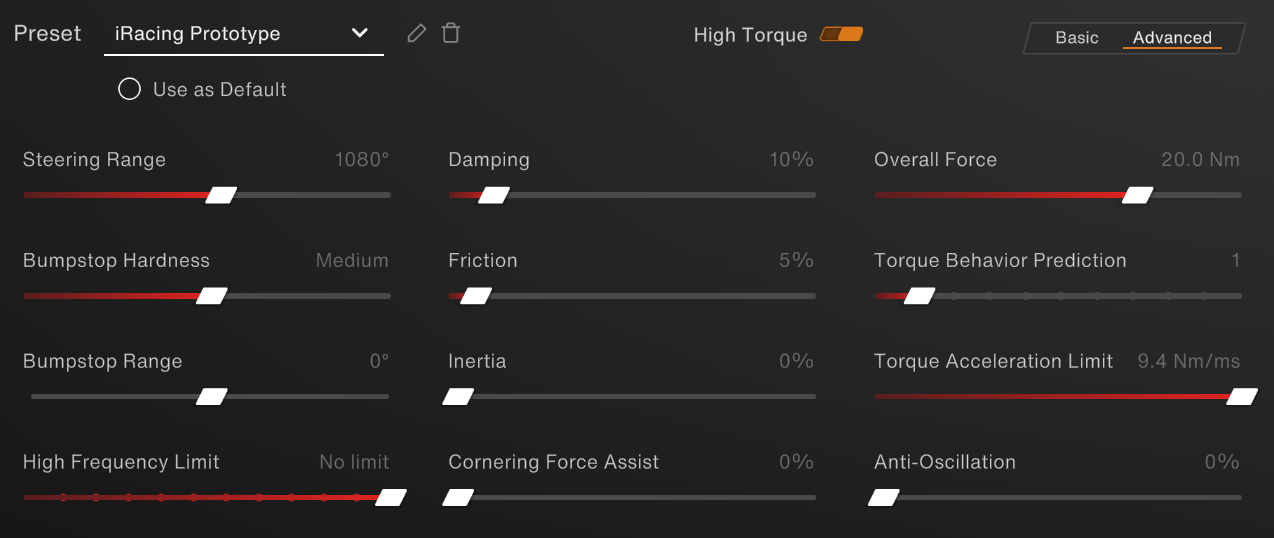
For our iRacing Prototype settings, we’ve looked at LMP3 and DTP cars in iRacing, but the settings can also be used for other high downforce prototype cars such as the Radicals.
The biggest changes to the settings compared to the standard/GT settings are the added friction and a lower overall Force on the Invicta:
- Invicta: 20 Nm
- All other bases: Max wheelbase strength
Damping: 10% – to help with damping the effects and add extra weight.
Friction 5% – this setting finetunes the feeling of the weight of the car.
Torque Behavior Prediction: 1 – helps with rough edges while still giving details.
Prototype Settings In-Game
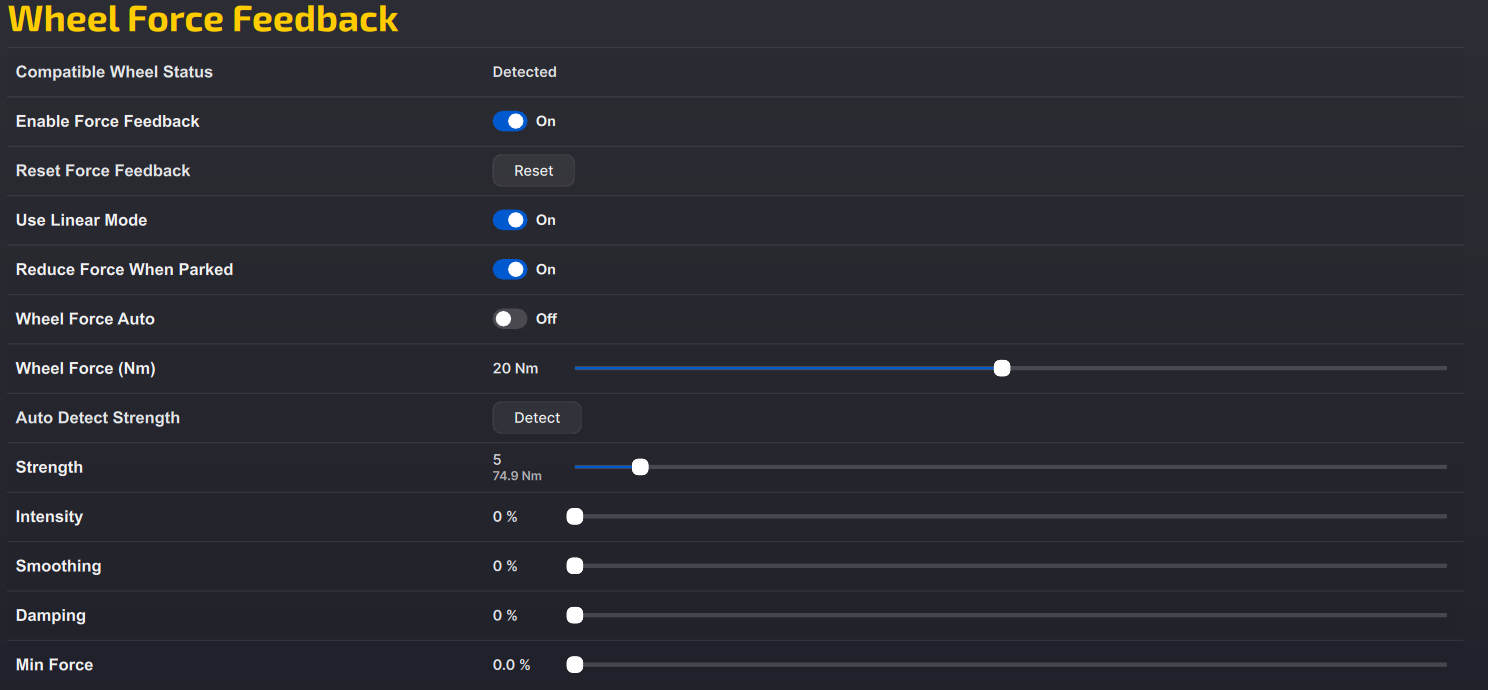
Wheel Force (This setting needs to match the same value in RaceHub)
- Invicta: 20 Nm
- All other bases: Max wheelbase strength
- Intensity: All bases: 0-10%
Once again, you’ll need to use the auto calculator in the black box, to get the exact force you need for the car you’re racing.
Formula Settings RaceHub:
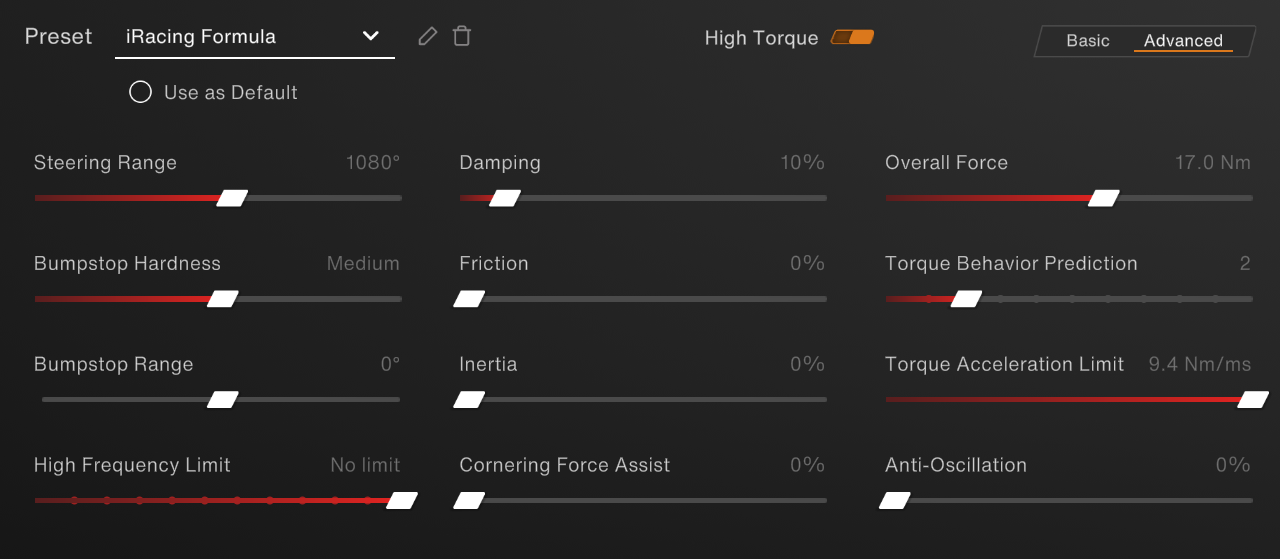
Formula racing is a very different genre. The cars rely heavily on downforce and carry a lot of speed through the corners.
For the overall Force, we have made changes to both the Invicta and Forte:
- Invicta: 17 Nm
- Forte: 17 Nm
- All other bases: Max wheelbase strength
Damping: 10% – to help with damping the effects and add extra weight.
Torque Behavior Prediction: 2 – helps with rough edges while still giving details.
Formula Settings In-game
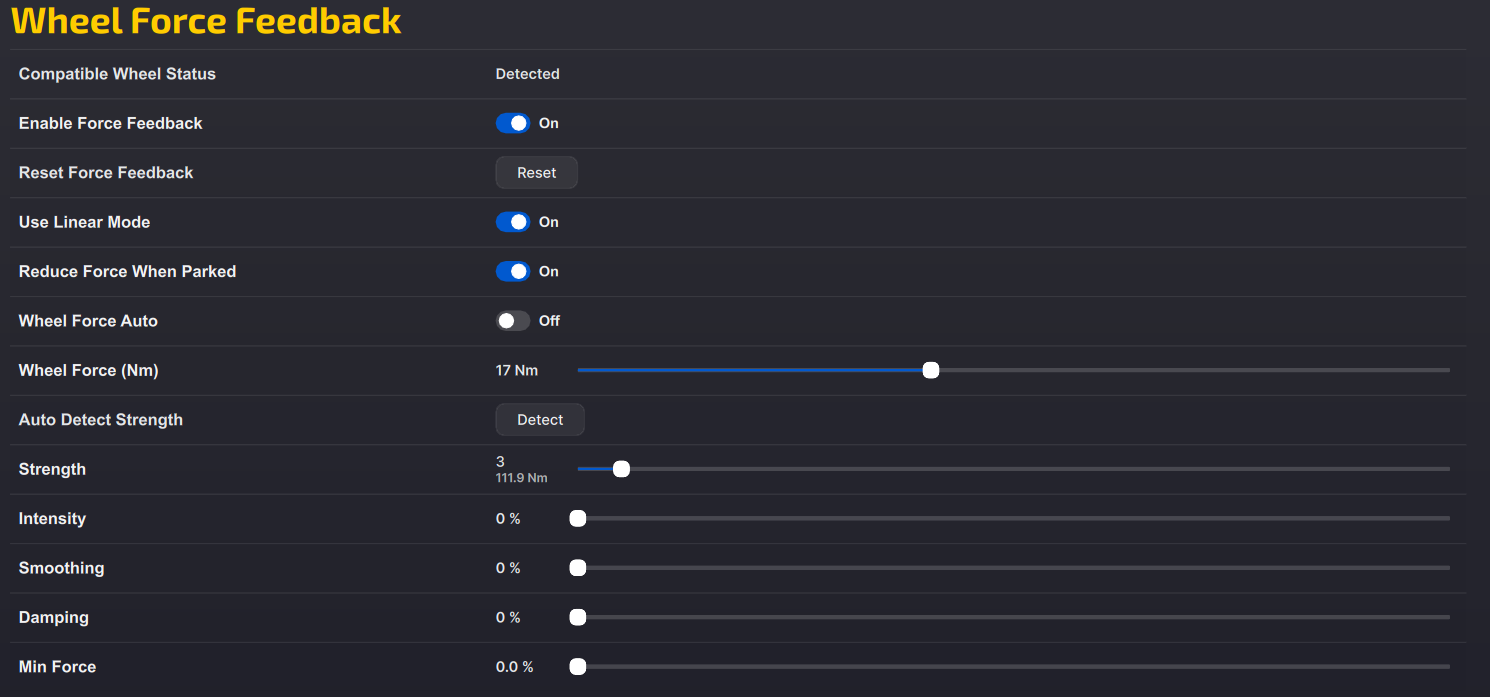
Wheel Force:
- Invicta: 17 Nm
- Forte: 17 Nm
- All other bases: Max wheelbase strength
- For the intensity: 0-10%
Once again, you’ll need to use the auto calculator in the black box, to get the exact force you need for the car you’re racing.
If you don’t use iRacing, you can find official wheelbase guides for other games here:
Haven’t got the gear for the job. Look no further 👇



 Back to top