


Sim Racing Seating Position: A Complete Guide

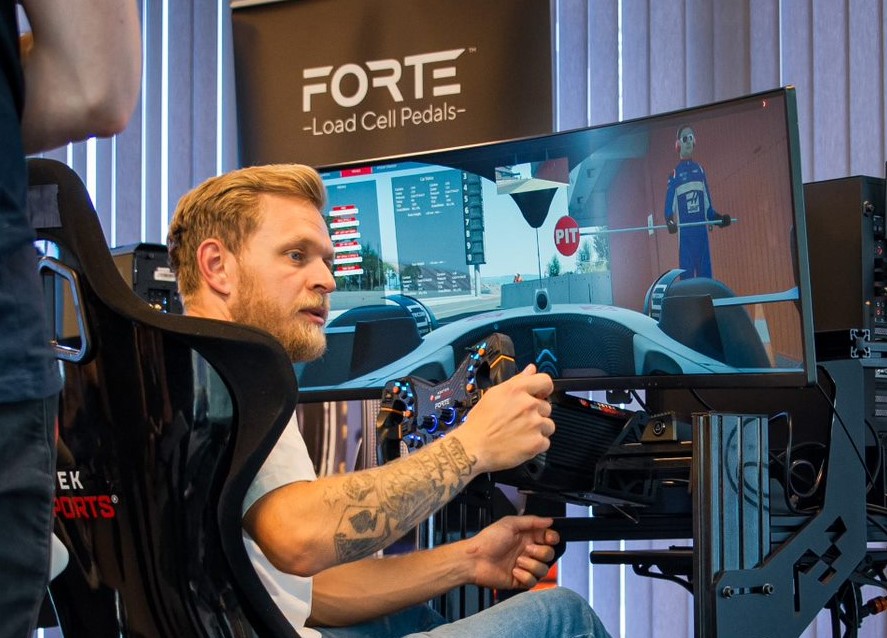
Your sim racing seating position affects more than comfort. It changes how you brake, steer, react, hold posture, feel force feedback, and stay consistent during long sessions.
The right position should let you reach the wheel without stretching, press the pedals without lifting your back from the seat, see the screen clearly, and stay relaxed through your shoulders, arms, legs, and lower back.
In this guide, we’ll show you how to set up your sim racing seat position, pedal distance, wheel height, backrest angle, screen distance, and driving posture for better comfort, control, and consistency.
Sim Racing Seating Position Checklist
Use this quick checklist to find a more comfortable and controlled sim racing position:
- Sit with your back supported
- Keep a slight bend in your knees when pressing the pedals
- Avoid fully locking your elbows when holding the wheel
- Keep your shoulders relaxed
- Position the wheel close enough for smooth steering input
- Make sure the pedals are not too far away
- Keep your monitor at a comfortable viewing height
- Avoid slouching or leaning too far back
- Adjust your seat angle for long-session comfort
- Test small changes one at a time
For a full overview of seat height, pedal distance, wheel position, monitor placement, cockpit comfort, and long-session setup, read our complete sim racing ergonomics guide.
The Importance of the Sim Racing Seating Position
When it comes to sim racing, the seating position holds tremendous importance in enhancing your overall sim racing experience.
Immersion and Realism
A proper seating position can greatly enhance the immersion and realism of your sim racing experience. By positioning yourself correctly, you can mimic the posture and movements of a real race car driver. This includes sitting upright with a slight forward lean, similar to the driving position in a real car.
When you achieve a realistic seating position, it helps you feel more connected to the virtual environment, improving the overall immersion of the simulation.
Ergonomics
Ergonomics is the science of designing products and environments to optimize human well-being and performance. In sim racing, ergonomics play a crucial role in ensuring your comfort and minimizing the risk of physical strain or injury.
A well-designed sim racing seat should offer adjustability options, allowing you to fine-tune the height, angle, and distance from the steering wheel and pedals. Proper ergonomics promote a natural alignment of your body, reducing the likelihood of discomfort, fatigue, and musculoskeletal issues during long gaming sessions.
Comfort
Comfort is essential for an enjoyable sim racing experience. It involves factors such as seat padding, lumbar support, and the overall fit of the seat.
A comfortable seating position allows you to focus on the race without distractions or discomfort. Adequate padding and support in the seat help to distribute your weight evenly, reducing pressure points and preventing soreness. Adjustable lumbar support is also important for maintaining proper spinal alignment and preventing lower back pain.
How to Find the Ideal Sim Racing Seat Position
When it comes to finding the right sim racing seat position, there are several factors that should be considered.
Distance from the screen
Positioning yourself at an appropriate distance from the screen is crucial for clear visibility and avoiding eye strain. A general guideline is to sit approximately 2 to 3 feet away from the screen, but the ideal distance may vary depending on your screen size, setup, and personal preference.
Your monitor position also affects posture, visibility, and comfort. For a deeper breakdown of screen height, viewing distance, and FOV, read our sim racing monitor position guide.
You should be able to see the entire screen without straining your eyes and have a wide field of view for a realistic racing experience.
Angle of the backrest
The angle of the backrest determines your posture and comfort level during long sim racing sessions. It’s recommended to adjust the backrest to a position where your spine maintains a natural curve. Sitting too upright or reclined can lead to discomfort or back pain. Experiment with different angles to find the one that provides good support while allowing you to reach the controls easily.
Distance from the pedals
The distance between your seat and the pedals is crucial for achieving proper leg positioning and efficient pedal control. When seated, your knees should be slightly bent and at a comfortable angle. Ensure that your feet can rest on the pedals without straining, and you can fully depress the pedals without lifting your heels off the floor. Adjust the seat forward or backward to find the optimal distance that allows for smooth and precise pedal inputs.
Take a look at our different sim racing pedals.
Angle of the pedal plate
Many sim racing setups have adjustable pedal plates that can be angled to suit individual preferences. The angle of the pedal plate should allow your feet to rest naturally and comfortably on the pedals. Typically, a slight downward tilt of the pedal plate helps prevent your feet from slipping off during intense racing maneuvers. Experiment with different angles to find the one that feels most natural and secure for your feet.
Mastering Control and Precision with the Correct Seating Position
Stability
A correct seating position allows you to maintain a stable and balanced posture. This stability is essential for making precise steering inputs, throttle control, and braking. When your body is properly aligned and supported by the seat, you can minimize unwanted movements or shifts in your position, ensuring that your inputs are consistent and accurate.
Ergonomics
An optimal seating position ensures that your body is aligned with the virtual steering wheel, pedals, and other controls. This alignment allows for a more natural and ergonomic range of motion, reducing strain on your muscles and joints. When your arms, hands, and feet are comfortably positioned, you can execute precise movements with less effort, enhancing control and reducing the risk of fatigue.
Feedback Sensitivity
A correct seating position enhances your ability to perceive and interpret feedback from the virtual car. When seated properly, you can better feel the subtle vibrations, forces, and weight shifts simulated by the game. This improved feedback sensitivity allows you to make quicker and more accurate adjustments to your driving technique, resulting in better control over the vehicle’s behavior.
Visual Perspective
The correct seating position also affects your visual perspective in sim racing. Being at the right distance from the screen and having the correct angle can enhance your field of view and depth perception. This enables you to judge distances, corners, and other elements of the track more accurately, allowing for precise positioning and line selection.
Reaction Time
A proper seating position can positively impact your reaction time. By being comfortably positioned, you can anticipate and respond to virtual hazards or sudden changes on the track more rapidly. This increased reaction time enables you to make split-second decisions, avoid collisions, and maintain control over your vehicle.
How to Optimize Sim Racing Wheel Position, Height & Angle
Optimizing the correct sim racing wheel height, angle, and position is essential for achieving a comfortable and ergonomic driving experience. Here’s a step-by-step guide on how to optimize these factors and what to be aware of:
Wheel Height
- Start by adjusting the height of your sim racing wheel to ensure your arms are comfortably positioned. The goal is to have your arms at a slightly bent position, resting comfortably on the wheel.
- Sit in your sim racing seat and adjust the wheel height accordingly. Most sim racing wheels come with height-adjustable mounts or stands that can be modified to suit your preference.
- Be aware of the height in relation to your seating position. Ensure that your arms are not fully extended or raised too high, as this can cause discomfort and strain during long gaming sessions.
Wheel Angle
- The angle of the sim racing wheel should allow for a natural and comfortable grip. Start by aligning the wheel horizontally, parallel to the ground, as a baseline.
- Sit in your sim racing seat and hold the wheel as if you were driving. Adjust the angle of the wheel to find a position that allows your hands to rest comfortably on the wheel without excessive strain on your wrists or arms.
- Be mindful of the angle’s impact on your line of sight. Ensure that the wheel doesn’t obstruct your view of the screen or important game information.
Wheel Position
- The positioning of the sim racing wheel should be optimized to mimic the real-world driving experience as closely as possible. This involves placing the wheel at an appropriate distance from your body.
- Sit in your sim racing seat and adjust the wheel’s position, bringing it closer or pushing it away to find the most comfortable and natural reach for your arms.
- Be aware of the distance between the wheel and your body. The ideal position is typically where your wrists rest on the top of the wheel without having to strain or stretch to reach the controls.
Check out our sim racing steering wheels.
GT seating position for sim racing
Getting the right seating position in sim racing is crucial for both comfort and control, especially when driving GT cars, where the seating position is more upright compared to formula cars. Adjusting your setup properly will help you drive more consistently, reduce fatigue, and improve precision during long races.
Adjust Your Seat
Start by positioning your seat upright, similar to a real GT race car. Your back should be well-supported, and your legs should be slightly bent when pressing the pedals. Avoid sitting too far back, as this can reduce control and reaction time.
Find the Right Distance to the Wheel
Your arms should have a slight bend when holding the wheel – not fully extended but not too close either. A good rule of thumb is to place your hands at the 9 and 3 o’clock positions and check if you can turn the wheel fully without overextending your arms.
Adjust the Wheel Height
The steering wheel should be positioned so that you can see your screen clearly while maintaining a comfortable grip. It should not be too low, causing strain, or too high, blocking your view.
Optimize Your Hand Position
In GT cars, the standard hand placement is 9 and 3 o’clock, allowing for better control and precision. Your thumbs should rest lightly on the wheel spokes, and your grip should be firm but relaxed to avoid unnecessary tension during long races.
By fine-tuning these adjustments, you can achieve a comfortable and efficient GT-style driving position, giving you better control, endurance, and immersion in every race.
Racing is all about precision – minor adjustments can have a major impact.
Formula seating position for sim racing
Formula-style seating is lower and more reclined than a typical GT seating position. Your legs are usually more stretched out, your seat angle is more laid back, and the wheel often sits higher relative to your torso.
This position can feel immersive for formula-style racing, but it also requires careful adjustment. If the seat is too reclined or the pedals are too far away, you may lose braking control or create tension in your hips and lower back.
For a comfortable formula seating position:
- Recline the seat more than a GT setup, but keep your back supported
- Make sure you can fully press the brake without lifting your lower back
- Keep a slight bend in your knees at full pedal pressure
- Position the wheel so your shoulders stay relaxed
- Avoid reaching upward or forward for the steering wheel
- Test whether your neck and lower back stay comfortable over longer sessions
Formula seating can work very well in sim racing, but it should still feel stable, supported, and natural.
LMP and hypercar seating position
LMP and hypercar seating positions often sit between GT and formula-style setups. They are usually lower and more reclined than GT cars, but not always as extreme as a formula position.
For sim racing, this means you should aim for a slightly reclined posture with strong back support, comfortable pedal reach, and a wheel position that lets you steer without overextending your arms.
A good LMP or hypercar-style seating position should give you:
- A slightly reclined but supported back angle
- Comfortable pedal reach
- Stable braking without hip or lower-back movement
- A wheel position that supports quick steering inputs
- Clear screen visibility without neck strain
If you race a mix of GT, prototype, and formula cars, choose a neutral position that feels comfortable across different driving styles rather than chasing one exact real-world cockpit position.
How far should you sit from the wheel?
A good rule of thumb is to sit close enough that your elbows stay slightly bent when holding the wheel at 9 and 3 o’clock. You should be able to turn the wheel smoothly without locking your elbows, leaning forward, or lifting your shoulders.
If the wheel is too far away, you may start reaching with your arms and upper body. This can reduce precision and create shoulder or neck tension. If the wheel is too close, your arms may feel cramped and your steering inputs can become less smooth.
Your wheel position is usually correct when:
- Your shoulders stay relaxed
- Your elbows have a slight bend
- Your wrists can reach the top of the wheel without stretching
- You can turn the wheel without leaning forward
- The wheel does not block your view of the screen
How far should your pedals be in sim racing?
Your pedals should be close enough that you can press the brake fully without stretching your leg or lifting your lower back from the seat. At full brake pressure, your knee should still have a slight bend.
If the pedals are too far away, you may overextend your legs and lose braking precision. If they are too close, your knees may feel cramped and your pedal inputs can become less smooth.
Your pedal position is usually correct when:
- Your knees stay slightly bent
- Your lower back stays in contact with the seat
- You can press the brake firmly without stretching
- Your feet rest naturally on the pedals
- You can move between throttle, brake, and clutch without tension
Common Mistakes to Avoid
Slouching or leaning back
Slouching or leaning back in your seat can lead to poor posture, reduced stability, and limited control over the steering wheel and pedals. It can also strain your neck and back over time. To avoid this mistake, sit upright with your back properly supported by the seat and maintain good posture throughout your gaming session.
Setting the wheel too high
A wheel that sits too high can create shoulder tension and block your view of the screen. Keep the wheel at a height where your arms feel relaxed and your vision stays clear.
Sitting too close or too far from the screen
Sitting too close to the screen can result in a distorted view, making it difficult to judge distances and corners accurately. On the other hand, sitting too far away can make it challenging to see details and react quickly. Ideally, you should position yourself at a distance where you can comfortably see the entire screen without straining your eyes. A common guideline is to sit at a distance of about one arm’s length away from the screen.
Incorrect height or angle of the seat
The height and angle of the seat are crucial for maintaining proper body alignment and reducing fatigue. If the seat is too high, your legs might be cramped, and your feet may not reach the pedals comfortably. If it’s too low, it can strain your knees and hinder your control. Additionally, the seat angle should be adjusted to provide optimal support and minimize stress on your back.
Reaching too far for the wheel
If the wheel is too far away, you may start driving with your shoulders and upper body instead of relaxed arm movement. This can reduce precision and create fatigue during longer sessions.
Sitting too far from the pedals
If your pedals are too far away, you may stretch your legs under braking and lose consistency. Your lower back should stay supported when pressing the brake fully.
Ignoring small adjustments
Seating position is rarely perfect on the first try. Make small changes to seat angle, pedal distance, and wheel reach, then test them over several laps before changing anything else.
So .. What is the Best Seating Position for Sim Racing?
The best seating position for sim racing can vary from person to person, as it depends on individual factors such as body proportions, preferences, and comfort. There is no one-size-fits-all solution.
But by looking at the areas mentioned in this guide, you have all the prerequisites to create the best Sim racing seating position for you.
You can also check our YouTube videos about sim racing ergonomics.





 Back to top